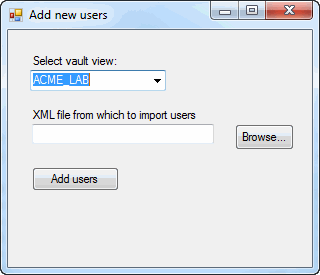
This example shows how to add users to a vault by deserializing an XML file containing user data.
NOTE: If using the primary interop assembly provided with SOLIDWORKS PDM Professional, see Using .NET Framework 4.0 in Stand-alone Applications.
'----------------------------------------------------------------------------
' Preconditions:
'  1. Create an XML file for this example.
'     a. Open a text editor like Notepad and copy and paste this code
'        into the editor.
'     b. Save the file as User.xml and remember where you save the file.
'  2. Start Microsoft Visual Studio.
'     a. Click File > New > Project > Visual Basic > Windows Forms Application.
'     b. Type AddUsers in Name.
'     c. Click Browse and navigate to the folder where to create
'        the project.
'     d. Click OK.
'     e. Click Show All Files in the Solution Explorer toolbar and expand
'        Form1.vb in the Solution Explorer.
'     f. Create a form similar to the form shown above and change:
'        1. Top label to VaultsLabel.
'        2. Combo box to VaultsComboBox.
'        3. Second label to XmlLabel.
'        4. Text box to XmlTextBox.
'        5. Browse button to BrowseButton.
'        6. Add users button to AddUsersButton.
'     g. Replace the code in Form1.vb with this code.
'     h. Replace the code in Form1.Designer.vb with this code.
'     i. Right-click the AddUsers project name in the Solution Explorer.
'        1. Click Add > Class > Class.
'        2. Type EdmVaultSingleton.vb in Name.
'        3. Click Add.
'        4. Replace the code in EdmVaultSingleton.vb with this code.
'     j. Right-click the AddUsers project name in the Solution Explorer.
'        1. Click Add > Class > Class.
'        2. Type User.vb in Name.
'        3. Click Add.
'        4. Replace the code in User.vb with this code.
'  3. Add EPDM.Interop.epdm.dll as a reference (right-click the project
'     name in the Solution Explorer, click Add Reference, click
'     Assemblies > Framework in the left-side panel, browse to the top folder of
'     your SOLIDWORKS PDM Professional installation, locate and click
'     EPDM.Interop.epdm.dll, click Open, click Add, and click Close).
'  4. Right-click EPDM.Interop.epdm in References, click Properties, and set
'     Embed Interop Types to False to handle methods that pass arrays of
'     structures.
'  5. Click Debug > Start Debugging or press F5.
'
' Postconditions:
'  1. Displays a dialog.
'  2. Select a vault.
'  3. Click Browse, locate and click User.xml, and click Open.
'  4. Click Add users.
'     A message box is displayed showing the names and IDs of the new users added
'     to the vault.
'  5. Click OK to close the message box.
'  6. Close the dialog.
'  7. Start and log into the SOLIDWORKS PDM Professional Administration
'     tool as Admin.
'  8. Expand the vault where the new users were added.
'  9. Expand Users to see the names of the new users.
' 10. Double-click jdoe.
'     a. Examine the properties.
'     b. Click Administrative Permissions and examine the permissions.
'     c. Click OK.
' 11. Double-click jsmith and repeat steps 10a - 10c.
'----------------------------------------------------------------------------
<?xml version="1.0" encoding="utf-8"?>
<ArrayOfAnyType xmlns:xsi="http://www.w3.org/2001/XMLSchema-instance" xmlns:xsd="http://www.w3.org/2001/XMLSchema">
  <anyType xsi:type="User">
      <sn>Doe</sn>
      <givenName>John</givenName>
      <title>Designer</title>
      <cn>John Doe</cn>
      <username>jdoe@yourcompany.com</username>
  </anyType>
  <anyType xsi:type="User">
      <sn>Smith</sn>
      <givenName>Jane</givenName>
      <title>Manager</title>
      <cn>Jane Smith</cn>
      <username>jsmith@yourcompany.com</username>
  </anyType>
</ArrayOfAnyType
>
'Form1.vb
Imports System.IO
Imports System.Xml.Serialization
Imports EPDM.Interop.epdm

Public Class AddUsers

  Private Sub BrowseButton_Click( _
     ByVal sender As System.Object, _
     ByVal e As System.EventArgs) _
     Handles BrowseButton.Click
    Try
      Dim dlgResult As DialogResult = XmlOpenFileDialog.ShowDialog()
      If dlgResult = Windows.Forms.DialogResult.Cancel Then
        Exit Sub
      End If
      XmlTextBox.Text = XmlOpenFileDialog.FileName
    Catch ex As Runtime.InteropServices.COMException
      MessageBox.Show("HRESULT = 0x" + _
      ex.ErrorCode.ToString("X") + vbCrLf + _
      ex.Message)
    Catch ex As Exception
      MessageBox.Show(ex.Message)
    End Try
  End Sub

    Private Sub AddUsersButton_Click( _
        ByVal sender As System.Object, _
        ByVal e As System.EventArgs) _
        Handles AddUsersButton.Click

        Dim StrReader As StreamReader = Nothing

        Try
            'Deserialize users from an XML file
            Dim ExtraTypes() As Type = {Type.GetType("AddUsers.User")}
            Dim XmlSer As New XmlSerializer( _
                Type.GetType("System.Collections.ArrayList"), _
                ExtraTypes)
            StrReader = New StreamReader(XmlTextBox.Text)
            Dim NewUsers As ArrayList = _
                XmlSer.Deserialize(StrReader)

            'Obtain the only instance of the IEdmVaultObject
            Dim vault As IEdmVault5 = EdmVaultSingleton.Instance

            If Not vault.IsLoggedIn Then
                'Log into selected vault as the current user
                vault.LoginAuto(VaultsComboBox.Text, _
                                Me.Handle.ToInt32())
            End If
            'Assign IEdmVault object to the IEdmUserMgr7 object
            Dim UsrMgr As IEdmUserMgr7 = vault

            'Declare EdmUserData array to hold new user data
            Dim UserData(NewUsers.Count - 1) As EdmUserData2
            'Set the EdmUserData members for each new user
            For i As Integer = 0 To NewUsers.Count - 1
                If Not NewUsers(i) Is Nothing Then
                    UserData(i).mbsCompleteName = NewUsers(i).cn
                    UserData(i).mbsEmail = NewUsers(i).username
                    UserData(i).mbsInitials = _
                        NewUsers(i).givenName.Substring(0, 1) + _
                        NewUsers(i).sn.SubString(0, 1)
                    UserData(i).mbsUserName = _
                        NewUsers(i).username.Split("@")(0)
                    'Return user's IEdmUser6 interface in mpoUser
                    UserData(i).mlFlags = _
                        EdmUserDataFlags.Edmudf_GetInterface
                    'Add this user even if others cannot be added
                    UserData(i).mlFlags += _
                        EdmUserDataFlags.Edmudf_ForceAdd
                    'Set permissions
                    Dim perms(2) As EdmSysPerm
                    perms(0) = EdmSysPerm.EdmSysPerm_EditUserMgr
                    perms(1) = EdmSysPerm.EdmSysPerm_EditReportQuery
                    perms(2) = EdmSysPerm.EdmSysPerm_MandatoryVersionComments
                    UserData(i).moSysPerms = perms

                End If
            Next i

            'Add the users to the vault
            UsrMgr.AddUsers2(UserData)

            Dim msg As String = ""
            For Each usr As EdmUserData2 In UserData
                If usr.mhStatus = 0 Then
                    msg += "Created user """ + usr.mpoUser.Name _
                        + """ successfully. ID = " _
                        + usr.mpoUser.ID.ToString() + vbCrLf
                Else
                    msg += "Error creating user """ _
                        + usr.mbsUserName + """ - " _
                        + vault.GetErrormessage(usr.mhStatus) + vbCrLf
                End If
            Next
            MessageBox.Show(msg)


        Catch ex As Runtime.InteropServices.COMException
            MessageBox.Show("HRESULT = 0x" + _
            ex.ErrorCode.ToString("X") + vbCrLf + _
            ex.Message)
        Catch ex As Exception
            MessageBox.Show(ex.Message)
        Finally
            If Not StrReader Is Nothing Then
                StrReader.Close()
            End If
        End Try
    End Sub

    Private Sub AddUsers_Load(ByVal sender As System.Object, ByVal e As System.EventArgs) Handles MyBase.Load

        Try

            'Obtain the only instance of the IEdmVault object
            Dim vault As IEdmVault8 = EdmVaultSingleton.Instance
            Dim Views() As EdmViewInfo = Nothing

            vault.GetVaultViews(Views, False)
            VaultsComboBox.Items.Clear()
            For Each View As EdmViewInfo In Views
                VaultsComboBox.Items.Add(View.mbsVaultName)
            Next
            If VaultsComboBox.Items.Count > 0 Then
                VaultsComboBox.Text = VaultsComboBox.Items(0)
            End If
        Catch ex As Runtime.InteropServices.COMException
            MessageBox.Show("HRESULT = 0x" + _
            ex.ErrorCode.ToString("X") + vbCrLf + _
            ex.Message)
        Catch ex As Exception
            MessageBox.Show(ex.Message)
        End Try
    End Sub
End Class
'Form1.Designer.vb
<Global.Microsoft.VisualBasic.CompilerServices.DesignerGenerated()> _
Partial Class AddUsers
    Inherits System.Windows.Forms.Form

    'Form overrides dispose to clean up the component list.
    <System.Diagnostics.DebuggerNonUserCode()> _
    Protected Overrides Sub Dispose(ByVal disposing As Boolean)
        Try
            If disposing AndAlso components IsNot Nothing Then
                components.Dispose()
            End If
        Finally
            MyBase.Dispose(disposing)
        End Try
    End Sub

    'Required by the Windows Form Designer.
    Private components As System.ComponentModel.IContainer

    'NOTE: The following procedure is required by the Windows Form Designer
    'It can be modified using the Windows Form Designer.
    'Do not modify it using the code editor.
    <System.Diagnostics.DebuggerStepThrough()> _
    Private Sub InitializeComponent()
        Me.BrowseButton = New System.Windows.Forms.Button()
        Me.XmlTextBox = New System.Windows.Forms.TextBox()
        Me.XmlLabel = New System.Windows.Forms.Label()
        Me.XmlOpenFileDialog = New System.Windows.Forms.OpenFileDialog()
        Me.AddUsersButton = New System.Windows.Forms.Button()
        Me.VaultsComboBox = New System.Windows.Forms.ComboBox()
        Me.VaultsLabel = New System.Windows.Forms.Label()
        Me.SuspendLayout()
        '
        'BrowseButton
        '
        Me.BrowseButton.Location = New System.Drawing.Point(227, 94)
        Me.BrowseButton.Margin = New System.Windows.Forms.Padding(2)
        Me.BrowseButton.Name = "BrowseButton"
        Me.BrowseButton.Size = New System.Drawing.Size(59, 26)
        Me.BrowseButton.TabIndex = 0
        Me.BrowseButton.Text = "Browse..."
        Me.BrowseButton.UseVisualStyleBackColor = True
        '
        'XmlTextBox
        '
        Me.XmlTextBox.Location = New System.Drawing.Point(24, 94)
        Me.XmlTextBox.Margin = New System.Windows.Forms.Padding(2)
        Me.XmlTextBox.Name = "XmlTextBox"
        Me.XmlTextBox.Size = New System.Drawing.Size(182, 20)
        Me.XmlTextBox.TabIndex = 1
        '
        'XmlLabel
        '
        Me.XmlLabel.AutoSize = True
        Me.XmlLabel.Location = New System.Drawing.Point(22, 78)
        Me.XmlLabel.Margin = New System.Windows.Forms.Padding(2, 0, 2, 0)
        Me.XmlLabel.Name = "XmlLabel"
        Me.XmlLabel.Size = New System.Drawing.Size(173, 13)
        Me.XmlLabel.TabIndex = 2
        Me.XmlLabel.Text = "XML file from which to import users:"
        '
        'XmlOpenFileDialog
        '
        Me.XmlOpenFileDialog.Filter = "XML files|*.xml"
        '
        'AddUsersButton
        '
        Me.AddUsersButton.Location = New System.Drawing.Point(24, 137)
        Me.AddUsersButton.Margin = New System.Windows.Forms.Padding(2)
        Me.AddUsersButton.Name = "AddUsersButton"
        Me.AddUsersButton.Size = New System.Drawing.Size(87, 24)
        Me.AddUsersButton.TabIndex = 3
        Me.AddUsersButton.Text = "Add users"
        Me.AddUsersButton.UseVisualStyleBackColor = True
        '
        'VaultsComboBox
        '
        Me.VaultsComboBox.FormattingEnabled = True
        Me.VaultsComboBox.Location = New System.Drawing.Point(22, 40)
        Me.VaultsComboBox.Margin = New System.Windows.Forms.Padding(2)
        Me.VaultsComboBox.Name = "VaultsComboBox"
        Me.VaultsComboBox.Size = New System.Drawing.Size(136, 21)
        Me.VaultsComboBox.TabIndex = 12
        '
        'VaultsLabel
        '
        Me.VaultsLabel.AutoSize = True
        Me.VaultsLabel.Location = New System.Drawing.Point(22, 24)
        Me.VaultsLabel.Margin = New System.Windows.Forms.Padding(2, 0, 2, 0)
        Me.VaultsLabel.Name = "VaultsLabel"
        Me.VaultsLabel.Size = New System.Drawing.Size(91, 13)
        Me.VaultsLabel.TabIndex = 13
        Me.VaultsLabel.Text = "Select vault view:"
        '
        'AddUsers
        '
        Me.AutoScaleDimensions = New System.Drawing.SizeF(6.0!, 13.0!)
        Me.AutoScaleMode = System.Windows.Forms.AutoScaleMode.Font
        Me.ClientSize = New System.Drawing.Size(304, 237)
        Me.Controls.Add(Me.VaultsComboBox)
        Me.Controls.Add(Me.VaultsLabel)
        Me.Controls.Add(Me.AddUsersButton)
        Me.Controls.Add(Me.XmlLabel)
        Me.Controls.Add(Me.XmlTextBox)
        Me.Controls.Add(Me.BrowseButton)
        Me.Margin = New System.Windows.Forms.Padding(2)
        Me.Name = "AddUsers"
        Me.Text = "Add new users"
        Me.ResumeLayout(False)
        Me.PerformLayout()

    End Sub
    Friend WithEvents BrowseButton As System.Windows.Forms.Button
    Friend WithEvents XmlTextBox As System.Windows.Forms.TextBox
    Friend WithEvents XmlLabel As System.Windows.Forms.Label
    Friend WithEvents XmlOpenFileDialog As System.Windows.Forms.OpenFileDialog
    Friend WithEvents AddUsersButton As System.Windows.Forms.Button
    Friend WithEvents VaultsComboBox As System.Windows.Forms.ComboBox
    Friend WithEvents VaultsLabel As System.Windows.Forms.Label

End Class
'EdmVaultSingleton.vb

Imports System.Threading

Imports EPDM.Interop.epdm

Public NotInheritable Class EdmVaultSingleton
  Private Shared mInstance As EdmVault5 = Nothing
  Private Shared mLockObj As New Object()

  Private Sub New()

  End Sub

  Public Shared ReadOnly Property Instance() As EdmVault5
    Get
      Try
        If mInstance Is Nothing Then
          Monitor.Enter(mLockObj)
          If mInstance Is Nothing Then
            mInstance = New EdmVault5()
          End If
          Monitor.Exit(mLockObj)
        End If
      Catch ex As Exception
        Monitor.Exit(mLockObj)
      End Try

      Return mInstance

    End Get
  End Property

End Class
'User.vb

Public Class User
   Private mSn As String         'First name
   Private mGivenName As String  'Last name
   Private mTitle As String      'Title
   Private mCn As String         'Complete name
   Private mUsername As String   'Email address

   Public Sub New()

   End Sub

   Public Property sn() As String
      Get
         sn = mSn
      End Get
      Set(ByVal Value As String)
         mSn = Value
      End Set
   End Property

   Public Property givenName() As String
      Get
         givenName = mGivenName
      End Get
      Set(ByVal Value As String)
         mGivenName = Value
      End Set
   End Property

   Public Property title() As String
      Get
         title = mTitle
      End Get
      Set(ByVal Value As String)
         mTitle = Value
      End Set
   End Property

   Public Property cn() As String
      Get
         cn = mCn
      End Get
      Set(ByVal Value As String)
         mCn = Value
      End Set
   End Property

   Public Property username() As String
      Get
         username = mUsername
      End Get
      Set(ByVal Value As String)
         mUsername = Value
      End Set
   End Property

End Class