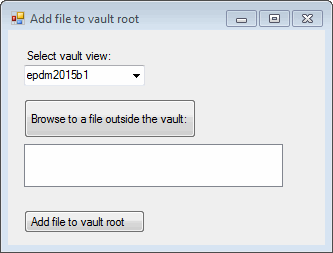
This example shows how to add a file outside the vault to the vault root.
NOTE: If using the primary interop assembly provided with SOLIDWORKS PDM Professional, see Using .NET Framework 4.0 in Stand-alone Applications.
'----------------------------------------------------------------------------
' Preconditions:
' 1. Start Microsoft Visual Studio.
'    a. Click File > New > Project > Visual Basic > Windows Forms Application.
'    b. Type AddFiles in Name.
'    c. Click Browse and navigate to the folder where to create
'       the project.
'    d. Click OK.
'    e. Click Show All Files in the Solution Explorer toolbar and expand
'       Form1.vb in the Solution Explorer.
'    f. Replace the code in Form1.vb with this code.
'    g. To create the form, replace the code in Form1.Designer.vb with this code.
' 2. Add EPDM.Interop.epdm.dll as a reference (right-click the project
'    name in the Solution Explorer, click Add Reference, click
'    Assemblies > Framework in the left-side panel, browse to the top folder of
'    your SOLIDWORKS PDM Professional installation, locate and click
'    EPDM.Interop.epdm.dll, click Open, and click Add).
' 3. Add EPDM.Interop.EPDMResultCode.dll as a reference (click Browse, locate and
'    click EPDM.Interop.EPDMResultCode.dll, click Open, click Add, and click Close).
' 4. Right-click EPDM.Interop.epdm in References, click Properties, and set
'    Embed Interop Types to False to handle methods that pass arrays of
'    structures.
' 5. Run the Administration tool, log in as admin, expand the vault,
'    right-click File Types, click Duplicate file name settings, and
'    click Do not allow duplicate files names in this file vault.
' 6  Ensure that at least one file exists in a subfolder in the vault and
'    the same-named file exists outside the vault.
' 7. Click Debug > Start Debugging or press F5.
'
' Postconditions:
' 1. Displays the Add file to vault root dialog box.
'    a. Select a vault view.
'    b. Click Browse to a file outside the vault.
'       1. Locate a file outside the vault that exists in
'          a subfolder in the vault.
'       2. Click Open.
'    c. Click Add file to vault root to add the selected file to the
'       root folder of the vault.
'    d. Displays a message box warning you that the selected file is not
'       unique in the vault, but that the file will be added to the vault root.
'    e. Click OK.
' 2. Close the Add file to vault root dialog box.
' 3. Examine the vault root.
'----------------------------------------------------------------------------
'Form1.vb

Imports System.IO
Imports System.Xml.Serialization
Imports System.Collections
Imports System.Collections.Generic
Imports System.Data
Imports System.Diagnostics
Imports System.Windows.Forms
Imports System.ComponentModel
Imports EPDM.Interop.epdm
Imports EPDM.Interop.EPDMResultCode


Public Class Form1
    Implements IEdmCallback6

    Private vault1 As IEdmVault5 = Nothing

    Public Sub Form1_Load(ByVal sender As System.Object, ByVal e As System.EventArgs) Handles MyBase.Load

        Try
            Dim vault1 As IEdmVault5 = New EdmVault5()
            Dim vault As IEdmVault8 = DirectCast(vault1, IEdmVault8)
            Dim Views As EdmViewInfo() = Nothing

            vault.GetVaultViews(Views, False)
            VaultsComboBox.Items.Clear()
            For Each View As EdmViewInfo In Views
                VaultsComboBox.Items.Add(View.mbsVaultName)
            Next
            If VaultsComboBox.Items.Count > 0 Then
                VaultsComboBox.Text = DirectCast(VaultsComboBox.Items(0), String)
            End If
        Catch ex As System.Runtime.InteropServices.COMException
            MessageBox.Show("HRESULT = 0x" + ex.ErrorCode.ToString("X") + " " + ex.Message)
        Catch ex As Exception
            MessageBox.Show(ex.Message)
        End Try
    End Sub

    Public Sub BrowseButton_Click(ByVal sender As System.Object, ByVal e As System.EventArgs) Handles BrowseButton.Click
        Try
            ListBox.Items.Clear()

            If vault1 Is Nothing Then
                vault1 = New EdmVault5()
            End If
            If Not vault1.IsLoggedIn Then
                'Log into selected vault as the current user
                vault1.LoginAuto(VaultsComboBox.Text, Me.Handle.ToInt32())
            End If

            'Set the initial directory in the Open dialog
            OpenFileDialog.InitialDirectory = vault1.RootFolderPath
            'Show the Open dialog
            Dim DialogResult As System.Windows.Forms.DialogResult = Nothing
            DialogResult = OpenFileDialog.ShowDialog()
            'If the user didn't click Open, exit
            If Not (DialogResult = System.Windows.Forms.DialogResult.OK) Then
                Return
            End If

            For Each FileName As String In OpenFileDialog.FileNames
                ListBox.Items.Add(FileName)
            Next
        Catch ex As System.Runtime.InteropServices.COMException
            MessageBox.Show("HRESULT = 0x" + ex.ErrorCode.ToString("X") + " " + ex.Message)
        Catch ex As Exception
            MessageBox.Show(ex.Message)
        End Try
    End Sub


    Public Sub AddFiles_Click(ByVal sender As System.Object, ByVal e As System.EventArgs) Handles AddFiles.Click
        Try

            Dim vault2 As IEdmVault7 = Nothing
            If vault1 Is Nothing Then
                vault1 = New EdmVault5()
            End If
            vault2 = DirectCast(vault1, IEdmVault7)
            If Not vault1.IsLoggedIn Then
                'Log into selected vault as the current user
                vault1.LoginAuto(VaultsComboBox.Text, Me.Handle.ToInt32())
            End If

            If Not ListBox.Items.Count = 1 Then
                MessageBox.Show("Please browse to a file outside the vault.")
                Exit Sub
            End If

            'Add file to the root folder of the vault
            Dim Folder1 As IEdmFolder5 = Nothing
            Dim Folder As IEdmFolder8 = DirectCast(Folder1, IEdmFolder5)

            Folder = vault2.RootFolder

            Dim Files() As EdmAddFileInfo
            ReDim Files(ListBox.Items.Count - 1)

            Dim FileNames(0) As String
            Dim Index As Integer = 0
            Dim fileStr = ""
            For Each FileName In ListBox.Items
                fileStr = FileName.ToString()
                FileNames(Index) = fileStr.Substring(fileStr.LastIndexOf("\"))
                Index = Index + 1
            Next

            Dim Path As String
            Dim addFileStatus As Integer
            Index = 0
            For Each FileName In ListBox.Items
                Path = FileName
                Files(Index).mbsPath = Path
                Files(Index).mlEdmAddFlags = EdmAddFlag.EdmAdd_Simple
                Files(Index).mlFileID = 0
                Files(Index).mlSrcDocumentID = 0
                Files(Index).mlSrcProjectID = 0
                Files(Index).mbsNewName = ""
                Folder.AddFile2(Me.Handle.ToInt32(), Files(Index).mbsPath, addFileStatus, "", Files(Index).mlEdmAddFlags)
                Select Case addFileStatus
                    Case EdmResultSuccessCodes_e.S_EDM_FILES_NOT_UNIQUE_GLOBALLY
                        MessageBox.Show("WARNING: File is not unique in the vault, but the file will be added to the vault root.")
                    Case Else
                        MessageBox.Show("SUCCESS: File will be added to the vault root.")
                End Select
                Index = Index + 1
            Next

        Catch ex As System.Runtime.InteropServices.COMException
            MessageBox.Show("HRESULT = 0x" + ex.ErrorCode.ToString("X") + " " + ex.Message)
        Catch ex As Exception
            MessageBox.Show(ex.Message)
        End Try
    End Sub

    Private Function IEdmCallback6_MsgBox(ByVal lParentWnd As Integer, ByVal lMsgID As Integer, ByVal bsMsg As String, Optional ByVal eType As EdmMBoxType = 0&) As EdmMBoxResult Implements IEdmCallback6.MsgBox

        MsgBox(bsMsg)
        IEdmCallback6_MsgBox = EdmMBoxResult.EdmMbr_OK

    End Function

    Private Sub IEdmCallback6_Resolve(ByVal lParentWnd As Integer, ByRef ppoItems() As EdmCmdData) Implements IEdmCallback6.Resolve

    End Sub

    Private Function IEdmCallback6_SetProgress(ByVal lBarIndex As Integer, ByVal lPos As Integer, ByVal bsMsg As String) As Boolean Implements IEdmCallback6.SetProgress

        IEdmCallback6_SetProgress = True

    End Function

    Private Sub IEdmCallback6_SetProgressRange(ByVal lBarIndex As Integer, ByVal lMax As Integer) Implements IEdmCallback6.SetProgressRange

    End Sub

    Private Sub IEdmCallback6_SetStatusMessage(ByVal lBarIndex As Integer, ByVal bsMessage As String) Implements IEdmCallback6.SetStatusMessage

    End Sub

End Class
'Form1.Designer.vb
<Global.Microsoft.VisualBasic.CompilerServices.DesignerGenerated()> _
Partial Class Form1
    Inherits System.Windows.Forms.Form
    ''' <summary>
    ''' Required designer variable.
    ''' </summary>
    Private components As System.ComponentModel.IContainer = Nothing

    ''' <summary>
    ''' Clean up any resources being used.
    ''' </summary>
    ''' <param name="disposing">true if managed resources should be disposed; otherwise, false.</param>
    Protected Overrides Sub Dispose(ByVal disposing As Boolean)
        If disposing AndAlso (components IsNot Nothing) Then
            components.Dispose()
        End If
        MyBase.Dispose(disposing)
    End Sub

#Region "Windows Form Designer generated code"

    ''' <summary>
    ''' Required method for Designer support - do not modify
    ''' the contents of this method with the code editor.
    ''' </summary>
    Private Sub InitializeComponent()
        Me.VaultsLabel = New System.Windows.Forms.Label()
        Me.VaultsComboBox = New System.Windows.Forms.ComboBox()
        Me.BrowseButton = New System.Windows.Forms.Button()
        Me.ListBox = New System.Windows.Forms.ListBox()
        Me.AddFiles = New System.Windows.Forms.Button()
        Me.OpenFileDialog = New System.Windows.Forms.OpenFileDialog()
        Me.SuspendLayout()
        '
        'VaultsLabel
        '
        Me.VaultsLabel.AutoSize = True
        Me.VaultsLabel.Location = New System.Drawing.Point(13, 26)
        Me.VaultsLabel.Name = "VaultsLabel"
        Me.VaultsLabel.Size = New System.Drawing.Size(94, 13)
        Me.VaultsLabel.TabIndex = 0
        Me.VaultsLabel.Text = " Select vault view:"
        Me.VaultsLabel.TextAlign = System.Drawing.ContentAlignment.MiddleLeft
        '
        'VaultsComboBox
        '
        Me.VaultsComboBox.FormattingEnabled = True
        Me.VaultsComboBox.Location = New System.Drawing.Point(16, 42)
        Me.VaultsComboBox.Name = "VaultsComboBox"
        Me.VaultsComboBox.Size = New System.Drawing.Size(121, 21)
        Me.VaultsComboBox.TabIndex = 1
        '
        'BrowseButton
        '
        Me.BrowseButton.Location = New System.Drawing.Point(16, 69)
        Me.BrowseButton.Name = "BrowseButton"
        Me.BrowseButton.Size = New System.Drawing.Size(259, 39)
        Me.BrowseButton.TabIndex = 3
        Me.BrowseButton.Text = "Browse to a file outside the vault:"
        Me.BrowseButton.TextAlign = System.Drawing.ContentAlignment.MiddleLeft
        Me.BrowseButton.UseVisualStyleBackColor = True
        '
        'ListBox
        '
        Me.ListBox.FormattingEnabled = True
        Me.ListBox.HorizontalScrollbar = True
        Me.ListBox.Location = New System.Drawing.Point(16, 114)
        Me.ListBox.Name = "ListBox"
        Me.ListBox.SelectionMode = System.Windows.Forms.SelectionMode.MultiExtended
        Me.ListBox.Size = New System.Drawing.Size(259, 43)
        Me.ListBox.TabIndex = 4
        '
        'AddFiles
        '
        Me.AddFiles.Location = New System.Drawing.Point(16, 180)
        Me.AddFiles.Name = "AddFiles"
        Me.AddFiles.RightToLeft = System.Windows.Forms.RightToLeft.No
        Me.AddFiles.Size = New System.Drawing.Size(121, 23)
        Me.AddFiles.TabIndex = 5
        Me.AddFiles.Text = "Add file to vault root"
        Me.AddFiles.TextAlign = System.Drawing.ContentAlignment.MiddleLeft
        Me.AddFiles.UseVisualStyleBackColor = True
        '
        'OpenFileDialog
        '
        Me.OpenFileDialog.Multiselect = True
        Me.OpenFileDialog.Title = "Open"
        '
        'Form1
        '
        Me.AutoScaleDimensions = New System.Drawing.SizeF(6.0!, 13.0!)
        Me.AutoScaleMode = System.Windows.Forms.AutoScaleMode.Font
        Me.ClientSize = New System.Drawing.Size(317, 215)
        Me.Controls.Add(Me.AddFiles)
        Me.Controls.Add(Me.ListBox)
        Me.Controls.Add(Me.BrowseButton)
        Me.Controls.Add(Me.VaultsComboBox)
        Me.Controls.Add(Me.VaultsLabel)
        Me.Name = "Form1"
        Me.Text = "Add file to vault root"
        Me.ResumeLayout(False)
        Me.PerformLayout()

    End Sub

#End Region

    Friend WithEvents VaultsLabel As System.Windows.Forms.Label
    Friend WithEvents VaultsComboBox As System.Windows.Forms.ComboBox
    Friend WithEvents BrowseButton As System.Windows.Forms.Button
    Friend WithEvents ListBox As System.Windows.Forms.ListBox
    Friend WithEvents AddFiles As System.Windows.Forms.Button
    Friend WithEvents OpenFileDialog As System.Windows.Forms.OpenFileDialog
End Class