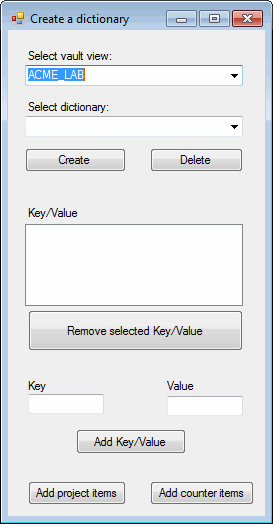
This example shows how to create and delete dictionaries and their keys and values.
NOTE: If using the primary interop assembly provided with SOLIDWORKS PDM Professional, see Using .NET Framework 4.0 in Stand-alone Applications.
'----------------------------------------------------------------------------
' Preconditions:
' 1. Start Microsoft Visual Studio.
'    a. Click File > New > Project > Visual Basic > Windows Forms Application.
'    b. Type AddDictionary in Name.
'    c. Click Browse and navigate to the folder where to create
'       the project.
'    d. Click OK.
'    e. Click Show All Files in the Solution Explorer toolbar and expand
'       Form1.vb in the Solution Explorer.
'    f. Replace the code in Form1.vb with this code.
'    g. To create the form, replace the code in Form1.Designer.vb with this code.
' 2. Add EPDM.Interop.epdm.dll as a reference (right-click the project
'    name in the Solution Explorer, click Add Reference, click
'    Assemblies > Framework in the left-side panel, browse to the top folder of
'    your SOLIDWORKS PDM Professional installation, locate and click
'    EPDM.Interop.epdm.dll, click Open, click Add, and click Close).
' 3. Right-click EPDM.Interop.epdm in References, click Properties, and set
'    Embed Interop Types to False to handle methods that pass arrays of
'    structures.
' 4. Click Debug > Start Debugging or press F5.
'
' Postconditions:
' 1. Displays a dialog.
' 2. Select a vault.
' 3. Select the Projects dictionary.
'    a. Click Create.
'    b. Click Add project items.
'       The Key/Value list is populated with the
'       Projects dictionary's keys and values.
'    c. Type a unique value in Key and any value in Value.
'    d. Click Add Key/Value.
'       The key and value are added to the Key/Value list.
'    e. Select a key and value in the Key/Value list and
'       click Remove selected Key/Value.
'       The selected key and value are deleted from the
'       dictionary.
'    f. Type an existing key in Key and any value in Value.
'    g. Click Add Key/Value.
'       A message box is displayed informing you that the
'       duplicate keys are prohibited. Neither the key
'       nor value was added to the dictionary.
'    h. Click OK to close the message box.
' 4. Select the Counters dictionary.
'    a. Click Create.
'    b. Click Add counter items.
'       The Key/Value list is populated with the Counters
'       dictionary's keys and values.
' 5. Experiment with creating your own dictionary and adding
'    and removing keys and values to and from that dictionary.
' 6. Close the dialog.
'----------------------------------------------------------------------------

'Form1.vb
Imports EPDM.Interop.epdm

Public Class AddDictionary

    Private vault As IEdmVault5 = Nothing

    Private Sub AddDictionary_Load(ByVal sender As System.Object, ByVal e As System.EventArgs) Handles MyBase.Load
        Try
            vault = New EdmVault5

            Dim Views() As EdmViewInfo = Nothing

            DirectCast(vault, IEdmVault8).GetVaultViews(Views, False)
            VaultsComboBox.Items.Clear()
            For Each View As EdmViewInfo In Views
                VaultsComboBox.Items.Add(View.mbsVaultName)
            Next
            If VaultsComboBox.Items.Count > 0 Then
                VaultsComboBox.Text = VaultsComboBox.Items(0)
            End If
        Catch ex As Runtime.InteropServices.COMException
            MessageBox.Show("HRESULT = 0x" + _
              ex.ErrorCode.ToString("X") + vbCrLf + _
              ex.Message)
        Catch ex As Exception
            MessageBox.Show(ex.Message)
        End Try
    End Sub

    Private Sub AddProjectItemsButton_Click( _
      ByVal sender As System.Object, _
      ByVal e As System.EventArgs) _
      Handles AddProjectItemsButton.Click

        Try
            If Not vault.IsLoggedIn Then
                'Log into selected vault as the current user
                vault.LoginAuto(VaultsComboBox.Text, _
                  Me.Handle.ToInt32())
            End If

            Dim ProjectDictionary As IEdmDictionary5
            ProjectDictionary = vault.GetDictionary( _
              "Projects", True) 'Create it if it doesn't exist

            'Add the new dictionary name to the combo box
            'if it doesn't exist
            If Not DictionaryComboBox.Items.Contains( _
                "Projects") Then
                DictionaryComboBox.Items.Add("Projects")
            End If

            Dim SuccessSet As Boolean = False
            SuccessSet = ProjectDictionary.StringTestAndSetAt _
              ("1000", "Mercedes Benz")
            SuccessSet = ProjectDictionary.StringTestAndSetAt _
              ("1001", "Lexus")
            SuccessSet = ProjectDictionary.StringTestAndSetAt _
              ("1002", "Porche")
            SuccessSet = ProjectDictionary.StringTestAndSetAt _
              ("1003", "Audi")
            SuccessSet = ProjectDictionary.StringTestAndSetAt _
              ("1004", "BMW")
            SuccessSet = ProjectDictionary.StringTestAndSetAt _
              ("1005", "Jaguar")

            If DictionaryComboBox.Text = "Projects" Then
                DisplayDictionaryItems("Projects", _
                  ProjectDictionary, KeyValueListBox)
            Else
                DictionaryComboBox.Text = "Projects"
            End If
        Catch ex As Runtime.InteropServices.COMException
            MessageBox.Show("HRESULT = 0x" + _
            ex.ErrorCode.ToString("X") + vbCrLf + _
            ex.Message)
        Catch ex As Exception
            MessageBox.Show(ex.Message)
        End Try
    End Sub

    Private Sub DictionaryComboBox_SelectedIndexChanged( _
      ByVal sender As System.Object, _
      ByVal e As System.EventArgs) _
      Handles DictionaryComboBox.SelectedIndexChanged

        Try
            If Not vault.IsLoggedIn Then
                'Log into selected vault as the current user
                vault.LoginAuto(VaultsComboBox.Text, _
                   Me.Handle.ToInt32())
            End If

            'Get the selected dictionary, if it exists
            Dim Dictionary As IEdmDictionary5
            Dictionary = vault.GetDictionary( _
              DictionaryComboBox.Text, False)
            'Display the dictionary contents
            DisplayDictionaryItems( _
              DictionaryComboBox.Text, _
              Dictionary, KeyValueListBox)
        Catch ex As Runtime.InteropServices.COMException
            MessageBox.Show("HRESULT = 0x" + _
            ex.ErrorCode.ToString("X") + vbCrLf + _
            ex.Message)
        Catch ex As Exception
            MessageBox.Show(ex.Message)
        End Try
    End Sub

    Private Sub CreateButton_Click( _
      ByVal sender As System.Object, _
      ByVal e As System.EventArgs) _
      Handles CreateButton.Click

        Try
            KeyValueListBox.Items.Clear()

            If Not vault.IsLoggedIn Then
                'Log into selected vault as the current user
                vault.LoginAuto(VaultsComboBox.Text, _
                   Me.Handle.ToInt32())
            End If

            'Get the selected dictionary, if it exists
            Dim Dictionary As IEdmDictionary5
            Dictionary = vault.GetDictionary( _
              DictionaryComboBox.Text, False)
            'If it doesn't exist, create it
            If Dictionary Is Nothing Then
                'Create it, because it doesn't exist
                Dictionary = vault.GetDictionary( _
                  DictionaryComboBox.Text, True)
                KeyValueListBox.Items.Add( _
                  DictionaryComboBox.Text + _
                  " dictionary created.")
            Else
                'If it does exist, inform the user
                KeyValueListBox.Items.Add( _
                  DictionaryComboBox.Text + _
                  " dictionary already exists.")
            End If

            'Add the new dictionary name to the combo box,
            'if it doesn't exist
            If Not DictionaryComboBox.Items.Contains( _
                              DictionaryComboBox.Text) Then
                DictionaryComboBox.Items.Add( _
                  DictionaryComboBox.Text)
            End If
        Catch ex As Runtime.InteropServices.COMException
            MessageBox.Show("HRESULT = 0x" + _
            ex.ErrorCode.ToString("X") + vbCrLf + _
            ex.Message)
        Catch ex As Exception
            MessageBox.Show(ex.Message)
        End Try
    End Sub

    Private Sub DeleteButton_Click( _
      ByVal sender As System.Object, _
      ByVal e As System.EventArgs) _
      Handles DeleteButton.Click

        Try
            KeyValueListBox.Items.Clear()
            If Not vault.IsLoggedIn Then
                'Log into selected vault as the current user
                vault.LoginAuto(VaultsComboBox.Text, _
                   Me.Handle.ToInt32())
            End If

            'Get the selected dictionary, if it exists
            Dim Dictionary As IEdmDictionary5
            Dictionary = vault.GetDictionary( _
              DictionaryComboBox.Text, False)
            'If it doesn't exist, inform the user
            If Dictionary Is Nothing Then
                KeyValueListBox.Items.Add( _
                  DictionaryComboBox.Text + _
                  " dictionary doesn't exist.")
                'If it does exist, delete it and inform the user
            Else
                Dictionary.RemoveDictionary()
                KeyValueListBox.Items.Add( _
                  DictionaryComboBox.Text + _
                  " dictionary deleted.")
            End If
            'Remove the dictionary name from the list box
            DictionaryComboBox.Items.Remove( _
              DictionaryComboBox.Text)
        Catch ex As Runtime.InteropServices.COMException
            MessageBox.Show("HRESULT = 0x" + _
            ex.ErrorCode.ToString("X") + vbCrLf + _
            ex.Message)
        Catch ex As Exception
            MessageBox.Show(ex.Message)
        End Try
    End Sub

    Private Sub AddKeyValueButton_Click( _
      ByVal sender As System.Object, _
      ByVal e As System.EventArgs) _
      Handles AddKeyValueButton.Click

        Try
            If Not vault.IsLoggedIn Then
                'Log into selected vault as the current user
                vault.LoginAuto(VaultsComboBox.Text, _
                   Me.Handle.ToInt32())
            End If

            Dim Dictionary As IEdmDictionary5
            Dictionary = vault.GetDictionary( _
              DictionaryComboBox.Text, False)

            'Make sure that the user has typed valid data
            If KeyTextBox.Text = "" _
                Or ValueTextBox.Text = "" Then
                MessageBox.Show("Please type a key and a value.")
                Exit Sub
            End If

            'Add the data if it doesn't exist in the dictionary
            Dim SuccessSet As Boolean = False
            SuccessSet = Dictionary.StringTestAndSetAt( _
              KeyTextBox.Text, ValueTextBox.Text)
            If Not SuccessSet Then
                MessageBox.Show("The value you typed for Key already exists; duplicate keys are prohibited. Neither the key or value was added to this dictionary. Try again.")
            Else
                DisplayDictionaryItems(DictionaryComboBox.Text, _
                  Dictionary, KeyValueListBox)
                KeyTextBox.Text = ""
                ValueTextBox.Text = ""
            End If
        Catch ex As Runtime.InteropServices.COMException
            MessageBox.Show("HRESULT = 0x" + _
            ex.ErrorCode.ToString("X") + vbCrLf + _
            ex.Message)
        Catch ex As Exception
            MessageBox.Show(ex.Message)
        End Try
    End Sub

    Private Sub RemoveButton_Click( _
      ByVal sender As System.Object, _
      ByVal e As System.EventArgs) _
      Handles RemoveButton.Click

        Try
            If KeyValueListBox.SelectedIndex = -1 Then
                MessageBox.Show("No Key/Value selected.")
                Exit Sub
            End If

            Dim KeyValue As String
            KeyValue = KeyValueListBox.Items( _
              KeyValueListBox.SelectedIndex)
            Dim key As String
            key = Split(KeyValue, vbTab)(0)

            If Not vault.IsLoggedIn Then
                'Log into selected vault as the current user
                vault.LoginAuto(VaultsComboBox.Text, _
                   Me.Handle.ToInt32())
            End If

            Dim Dictionary As IEdmDictionary5
            Dictionary = vault.GetDictionary( _
              DictionaryComboBox.Text, False)

            Dictionary.StringRemoveAt(key)
            KeyValueListBox.Items.Remove(KeyValue)
        Catch ex As Runtime.InteropServices.COMException
            MessageBox.Show("HRESULT = 0x" + _
            ex.ErrorCode.ToString("X") + vbCrLf + _
            ex.Message)
        Catch ex As Exception
            MessageBox.Show(ex.Message)
        End Try
    End Sub

    Private Sub AddCounterItemsButton_Click( _
      ByVal sender As System.Object, _
      ByVal e As System.EventArgs) _
      Handles AddCounterItemsButton.Click

        Try

            If Not vault.IsLoggedIn Then
                'Log into selected vault as the current user
                vault.LoginAuto(VaultsComboBox.Text, _
                   Me.Handle.ToInt32())
            End If

            Dim CounterDictionary As IEdmDictionary5
            CounterDictionary = vault.GetDictionary _
              ("Counters", True) 'Create it, if it doesn't exist

            'Add the new dictionary name to the list box,
            'if it doesn't exist
            If Not DictionaryComboBox.Items.Contains( _
                "Counters") Then
                DictionaryComboBox.Items.Add("Counters")
            End If

            Dim SuccessSet As Boolean = False
            SuccessSet = CounterDictionary.StringTestAndSetAt _
              ("Electric", "5")
            SuccessSet = CounterDictionary.StringTestAndSetAt _
              ("Hybrid", "10")
            SuccessSet = CounterDictionary.StringTestAndSetAt _
              ("Gasoline", "15")
            SuccessSet = CounterDictionary.StringTestAndSetAt _
              ("Diesel", "20")

            If DictionaryComboBox.Text = "Counters" Then
                DisplayDictionaryItems("Counters", _
                  CounterDictionary, KeyValueListBox)
            Else
                DictionaryComboBox.Text = "Counters"
            End If
        Catch ex As Runtime.InteropServices.COMException
            MessageBox.Show("HRESULT = 0x" + _
            ex.ErrorCode.ToString("X") + vbCrLf + _
            ex.Message)
        Catch ex As Exception
            MessageBox.Show(ex.Message)
        End Try
    End Sub

    Private Sub DisplayDictionaryItems( _
      ByVal DictionaryName As String, _
      ByVal Dictionary As IEdmDictionary5, _
      ByVal ListObject As Object)

        Try
            ListObject.Items.Clear()

            If Dictionary Is Nothing Then
                ListObject.Items.Add(DictionaryComboBox.Text + _
                  " dictionary doesn't exist.")
            Else
                'Traverse and display the Key/Value pairs
                'in the dictionary
                Dim Key As String = ""
                Dim Value As String = ""
                Dim Pos As IEdmPos5
                Pos = Dictionary.StringGetFirstPosition()
                While Not Pos.IsNull
                    Dictionary.StringGetNextAssoc(Pos, Key, Value)
                    ListObject.Items.Add(Key + vbTab + Value)
                End While
            End If
        Catch ex As Runtime.InteropServices.COMException
            MessageBox.Show("HRESULT = 0x" + _
            ex.ErrorCode.ToString("X") + vbCrLf + _
            ex.Message)
        Catch ex As Exception
            MessageBox.Show(ex.Message)
        End Try
    End Sub

End Class
<Global.Microsoft.VisualBasic.CompilerServices.DesignerGenerated()> _
Partial Class AddDictionary
   Inherits System.Windows.Forms.Form

   'Form overrides dispose to clean up the component list.
   <System.Diagnostics.DebuggerNonUserCode()> _
   Protected Overrides Sub Dispose(ByVal disposing As Boolean)
      Try
         If disposing AndAlso components IsNot Nothing Then
            components.Dispose()
         End If
      Finally
         MyBase.Dispose(disposing)
      End Try
   End Sub

   'Required by the Windows Form Designer
   Private components As System.ComponentModel.IContainer

   'NOTE: The following procedure is required by the Windows Form Designer
   'It can be modified using the Windows Form Designer.
   'Do not modify it using the code editor.
   <System.Diagnostics.DebuggerStepThrough()> _
   Private Sub InitializeComponent()
        Me.VaultsComboBox = New System.Windows.Forms.ComboBox()
        Me.VaultsLabel = New System.Windows.Forms.Label()
        Me.AddProjectItemsButton = New System.Windows.Forms.Button()
        Me.DictionaryComboBox = New System.Windows.Forms.ComboBox()
        Me.DictionaryLabel = New System.Windows.Forms.Label()
        Me.KeyValueListBox = New System.Windows.Forms.ListBox()
        Me.KeyValueLabel = New System.Windows.Forms.Label()
        Me.CreateButton = New System.Windows.Forms.Button()
        Me.DeleteButton = New System.Windows.Forms.Button()
        Me.KeyTextBox = New System.Windows.Forms.TextBox()
        Me.ValueTextBox = New System.Windows.Forms.TextBox()
        Me.KeyLabel = New System.Windows.Forms.Label()
        Me.ValueLabel = New System.Windows.Forms.Label()
        Me.AddKeyValueButton = New System.Windows.Forms.Button()
        Me.RemoveButton = New System.Windows.Forms.Button()
        Me.AddCounterItemsButton = New System.Windows.Forms.Button()
        Me.SuspendLayout()
        '
        'VaultsComboBox
        '
        Me.VaultsComboBox.FormattingEnabled = True
        Me.VaultsComboBox.Location = New System.Drawing.Point(17, 35)
        Me.VaultsComboBox.Margin = New System.Windows.Forms.Padding(2)
        Me.VaultsComboBox.Name = "VaultsComboBox"
        Me.VaultsComboBox.Size = New System.Drawing.Size(218, 21)
        Me.VaultsComboBox.TabIndex = 14
        '
        'VaultsLabel
        '
        Me.VaultsLabel.AutoSize = True
        Me.VaultsLabel.Location = New System.Drawing.Point(17, 19)
        Me.VaultsLabel.Margin = New System.Windows.Forms.Padding(2, 0, 2, 0)
        Me.VaultsLabel.Name = "VaultsLabel"
        Me.VaultsLabel.Size = New System.Drawing.Size(91, 13)
        Me.VaultsLabel.TabIndex = 15
        Me.VaultsLabel.Text = "Select vault view:"
        '
        'AddProjectItemsButton
        '
        Me.AddProjectItemsButton.Location = New System.Drawing.Point(20, 451)
        Me.AddProjectItemsButton.Margin = New System.Windows.Forms.Padding(2)
        Me.AddProjectItemsButton.Name = "AddProjectItemsButton"
        Me.AddProjectItemsButton.Size = New System.Drawing.Size(98, 24)
        Me.AddProjectItemsButton.TabIndex = 16
        Me.AddProjectItemsButton.Text = "Add project items"
        Me.AddProjectItemsButton.UseVisualStyleBackColor = True
        '
        'DictionaryComboBox
        '
        Me.DictionaryComboBox.FormattingEnabled = True
        Me.DictionaryComboBox.Items.AddRange(New Object() {"Projects", "Counters"})
        Me.DictionaryComboBox.Location = New System.Drawing.Point(17, 86)
        Me.DictionaryComboBox.Margin = New System.Windows.Forms.Padding(2)
        Me.DictionaryComboBox.Name = "DictionaryComboBox"
        Me.DictionaryComboBox.Size = New System.Drawing.Size(218, 21)
        Me.DictionaryComboBox.TabIndex = 17
        '
        'DictionaryLabel
        '
        Me.DictionaryLabel.AutoSize = True
        Me.DictionaryLabel.Location = New System.Drawing.Point(17, 70)
        Me.DictionaryLabel.Margin = New System.Windows.Forms.Padding(2, 0, 2, 0)
        Me.DictionaryLabel.Name = "DictionaryLabel"
        Me.DictionaryLabel.Size = New System.Drawing.Size(88, 13)
        Me.DictionaryLabel.TabIndex = 18
        Me.DictionaryLabel.Text = "Select dictionary:"
        '
        'KeyValueListBox
        '
        Me.KeyValueListBox.FormattingEnabled = True
        Me.KeyValueListBox.Location = New System.Drawing.Point(17, 194)
        Me.KeyValueListBox.Margin = New System.Windows.Forms.Padding(2)
        Me.KeyValueListBox.Name = "KeyValueListBox"
        Me.KeyValueListBox.Size = New System.Drawing.Size(218, 82)
        Me.KeyValueListBox.TabIndex = 19
        '
        'KeyValueLabel
        '
        Me.KeyValueLabel.AutoSize = True
        Me.KeyValueLabel.Location = New System.Drawing.Point(17, 176)
        Me.KeyValueLabel.Margin = New System.Windows.Forms.Padding(2, 0, 2, 0)
        Me.KeyValueLabel.Name = "KeyValueLabel"
        Me.KeyValueLabel.Size = New System.Drawing.Size(57, 13)
        Me.KeyValueLabel.TabIndex = 20
        Me.KeyValueLabel.Text = "Key/Value"
        '
        'CreateButton
        '
        Me.CreateButton.Location = New System.Drawing.Point(17, 118)
        Me.CreateButton.Margin = New System.Windows.Forms.Padding(2)
        Me.CreateButton.Name = "CreateButton"
        Me.CreateButton.Size = New System.Drawing.Size(101, 24)
        Me.CreateButton.TabIndex = 21
        Me.CreateButton.Text = "Create"
        Me.CreateButton.UseVisualStyleBackColor = True
        '
        'DeleteButton
        '
        Me.DeleteButton.Location = New System.Drawing.Point(142, 118)
        Me.DeleteButton.Margin = New System.Windows.Forms.Padding(2)
        Me.DeleteButton.Name = "DeleteButton"
        Me.DeleteButton.Size = New System.Drawing.Size(93, 24)
        Me.DeleteButton.TabIndex = 22
        Me.DeleteButton.Text = "Delete"
        Me.DeleteButton.UseVisualStyleBackColor = True
        '
        'KeyTextBox
        '
        Me.KeyTextBox.Location = New System.Drawing.Point(20, 364)
        Me.KeyTextBox.Margin = New System.Windows.Forms.Padding(2)
        Me.KeyTextBox.Name = "KeyTextBox"
        Me.KeyTextBox.Size = New System.Drawing.Size(76, 20)
        Me.KeyTextBox.TabIndex = 23
        '
        'ValueTextBox
        '
        Me.ValueTextBox.Location = New System.Drawing.Point(159, 366)
        Me.ValueTextBox.Margin = New System.Windows.Forms.Padding(2)
        Me.ValueTextBox.Name = "ValueTextBox"
        Me.ValueTextBox.Size = New System.Drawing.Size(76, 20)
        Me.ValueTextBox.TabIndex = 24
        '
        'KeyLabel
        '
        Me.KeyLabel.AutoSize = True
        Me.KeyLabel.Location = New System.Drawing.Point(17, 349)
        Me.KeyLabel.Margin = New System.Windows.Forms.Padding(2, 0, 2, 0)
        Me.KeyLabel.Name = "KeyLabel"
        Me.KeyLabel.Size = New System.Drawing.Size(25, 13)
        Me.KeyLabel.TabIndex = 25
        Me.KeyLabel.Text = "Key"
        '
        'ValueLabel
        '
        Me.ValueLabel.AutoSize = True
        Me.ValueLabel.Location = New System.Drawing.Point(156, 349)
        Me.ValueLabel.Margin = New System.Windows.Forms.Padding(2, 0, 2, 0)
        Me.ValueLabel.Name = "ValueLabel"
        Me.ValueLabel.Size = New System.Drawing.Size(34, 13)
        Me.ValueLabel.TabIndex = 26
        Me.ValueLabel.Text = "Value"
        '
        'AddKeyValueButton
        '
        Me.AddKeyValueButton.Location = New System.Drawing.Point(68, 399)
        Me.AddKeyValueButton.Margin = New System.Windows.Forms.Padding(2)
        Me.AddKeyValueButton.Name = "AddKeyValueButton"
        Me.AddKeyValueButton.Size = New System.Drawing.Size(110, 25)
        Me.AddKeyValueButton.TabIndex = 27
        Me.AddKeyValueButton.Text = "Add Key/Value"
        Me.AddKeyValueButton.UseVisualStyleBackColor = True
        '
        'RemoveButton
        '
        Me.RemoveButton.Location = New System.Drawing.Point(20, 280)
        Me.RemoveButton.Margin = New System.Windows.Forms.Padding(2)
        Me.RemoveButton.Name = "RemoveButton"
        Me.RemoveButton.Size = New System.Drawing.Size(215, 41)
        Me.RemoveButton.TabIndex = 28
        Me.RemoveButton.Text = "Remove selected Key/Value"
        Me.RemoveButton.UseVisualStyleBackColor = True
        '
        'AddCounterItemsButton
        '
        Me.AddCounterItemsButton.Location = New System.Drawing.Point(142, 451)
        Me.AddCounterItemsButton.Margin = New System.Windows.Forms.Padding(2)
        Me.AddCounterItemsButton.Name = "AddCounterItemsButton"
        Me.AddCounterItemsButton.Size = New System.Drawing.Size(104, 24)
        Me.AddCounterItemsButton.TabIndex = 29
        Me.AddCounterItemsButton.Text = "Add counter items"
        Me.AddCounterItemsButton.UseVisualStyleBackColor = True
        '
        'AddDictionary
        '
        Me.AutoScaleDimensions = New System.Drawing.SizeF(6.0!, 13.0!)
        Me.AutoScaleMode = System.Windows.Forms.AutoScaleMode.Font
        Me.ClientSize = New System.Drawing.Size(257, 486)
        Me.Controls.Add(Me.AddCounterItemsButton)
        Me.Controls.Add(Me.RemoveButton)
        Me.Controls.Add(Me.AddKeyValueButton)
        Me.Controls.Add(Me.ValueLabel)
        Me.Controls.Add(Me.KeyLabel)
        Me.Controls.Add(Me.ValueTextBox)
        Me.Controls.Add(Me.KeyTextBox)
        Me.Controls.Add(Me.DeleteButton)
        Me.Controls.Add(Me.CreateButton)
        Me.Controls.Add(Me.KeyValueLabel)
        Me.Controls.Add(Me.KeyValueListBox)
        Me.Controls.Add(Me.DictionaryComboBox)
        Me.Controls.Add(Me.DictionaryLabel)
        Me.Controls.Add(Me.AddProjectItemsButton)
        Me.Controls.Add(Me.VaultsComboBox)
        Me.Controls.Add(Me.VaultsLabel)
        Me.Margin = New System.Windows.Forms.Padding(2)
        Me.Name = "AddDictionary"
        Me.Text = "Create a dictionary"
        Me.ResumeLayout(False)
        Me.PerformLayout()

    End Sub
   Friend WithEvents VaultsComboBox As System.Windows.Forms.ComboBox
   Friend WithEvents VaultsLabel As System.Windows.Forms.Label
   Friend WithEvents AddProjectItemsButton As System.Windows.Forms.Button
   Friend WithEvents DictionaryComboBox As System.Windows.Forms.ComboBox
   Friend WithEvents DictionaryLabel As System.Windows.Forms.Label
   Friend WithEvents KeyValueListBox As System.Windows.Forms.ListBox
   Friend WithEvents KeyValueLabel As System.Windows.Forms.Label
   Friend WithEvents CreateButton As System.Windows.Forms.Button
   Friend WithEvents DeleteButton As System.Windows.Forms.Button
   Friend WithEvents KeyTextBox As System.Windows.Forms.TextBox
   Friend WithEvents ValueTextBox As System.Windows.Forms.TextBox
   Friend WithEvents KeyLabel As System.Windows.Forms.Label
   Friend WithEvents ValueLabel As System.Windows.Forms.Label
   Friend WithEvents AddKeyValueButton As System.Windows.Forms.Button
   Friend WithEvents RemoveButton As System.Windows.Forms.Button
   Friend WithEvents AddCounterItemsButton As System.Windows.Forms.Button

End Class