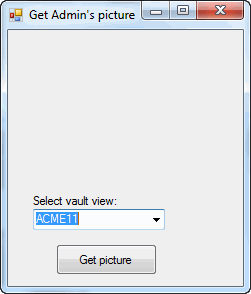
This example shows how to display a user's picture in a form and pop up user information when hovering over a form label.
NOTE: If using the primary interop assembly provided with SOLIDWORKS PDM Professional, see Using .NET Framework 4.0 in Stand-alone Applications.
//----------------------------------------------------------------------------
// Preconditions:
// 1. Start Microsoft Visual Studio.
// a. Click File > New > Project > Visual
C# > Windows Forms Application.
// b. Type CreateUserPicture_CSharp in Name.
// c. Click Browse and navigate to the folder where to create
// the project.
// d. Click OK.
// e. Click Show All Files in the Solution Explorer toolbar and expand
// Form1.cs in the Solution Explorer.
// f. Replace the code in Form1.cs with this code.
// g. To create the form,
replace the code in Form1.Designer.cs with this code.
// 2. Add EPDM.Interop.epdm.dll as a reference (right-click the project
// name in the Solution Explorer, click Add Reference, click
// Assemblies > Framework in the left-side panel, browse to the top folder of
// your SOLIDWORKS PDM Professional installation, locate and click
// EPDM.Interop.epdm.dll, click Open, click Add,
and click Close).
// 3. Right-click EPDM.Interop.epdm in References, click Properties, and set
// Embed Interop Types to False to handle methods that pass arrays of
// structures.
// 4. Click Debug > Start Debugging or press F5.
//
// Postconditions:
// 1. Displays the Get
Admin's picture dialog box.
// 2. Select a vault view.
// 3. Click Get
picture.
//
4. Displays a picture of the Admin of the selected vault.
// 5. Hover over System Administrator.
// 6. Pops up a window with the Admin's information.
// 7. Close the Get
Admin's picture dialog box.
//----------------------------------------------------------------------------
//Form1.cs
using System;
using System.Collections.Generic;
using System.ComponentModel;
using System.Data;
using System.Drawing;
using System.Linq;
using System.Text;
using System.Windows.Forms;
using EPDM.Interop.epdm;
namespace CreateUserPicture_CSharp
{
public partial class Form1 : Form
{
public Form1()
{
InitializeComponent();
}
IEdmImage mpoImage;
public void Form1_Load(System.Object sender, System.EventArgs e)
{
IEdmVault8 vault = (IEdmVault8)new EdmVault5();
EdmViewInfo[] Views = {
};
vault.GetVaultViews(out Views, false);
VaultsComboBox.Items.Clear();
foreach (EdmViewInfo View in Views)
{
VaultsComboBox.Items.Add(View.mbsVaultName);
}
if (VaultsComboBox.Items.Count > 0)
{
VaultsComboBox.Text = (string)VaultsComboBox.Items[0];
}
}
private void Button1_Click(System.Object sender, System.EventArgs e)
{
try
{
IEdmVault5 vault = default(IEdmVault5);
IEdmVault12 vault2 = default(IEdmVault12);
vault = new EdmVault5();
vault2 = (IEdmVault12)vault;
vault.LoginAuto(VaultsComboBox.Text, this.Handle.ToInt32());
IEdmUserMgr8 poUserMgr = default(IEdmUserMgr8);
poUserMgr = (IEdmUserMgr8)vault2.CreateUtility(EdmUtility.EdmUtil_UserMgr);
//Create a bounding rectangle for the picture
EdmRect oRect = default(EdmRect);
oRect.mlTop = 10;
oRect.mlLeft = 10;
oRect.mlRight = oRect.mlLeft + 80;
oRect.mlBottom = oRect.mlTop + 100;
//Create the Admin user's image
IEdmUser10 poAdmin = default(IEdmUser10);
poAdmin = (IEdmUser10)poUserMgr.GetUser("Admin");
mpoImage = poUserMgr.CreateUserPicture(this.Handle.ToInt32(), ref oRect, poAdmin.ID);
Label1.Text = poAdmin.FullName;
//Invalidate the window to trigger a call to OnPaintPic
this.Invalidate();
}
catch (System.Runtime.InteropServices.COMException ex)
{
MessageBox.Show("HRESULT = 0x" + ex.ErrorCode.ToString("X") + " " + ex.Message);
}
catch (Exception ex)
{
MessageBox.Show(ex.Message);
}
}
//Displays the Admin user's picture when the form is repainted
private void Form1_Paint(System.Object sender, System.Windows.Forms.PaintEventArgs e)
{
if ((mpoImage != null))
{
mpoImage.Paint(e.Graphics.GetHdc().ToInt32());
}
}
//Called when the user hovers over the form label, Label1
private void Label1_MouseHover(System.Object sender, System.EventArgs e)
{
IEdmVault12 poVault = default(IEdmVault12);
poVault = (IEdmVault12)new EdmVault5();
poVault.LoginAuto(VaultsComboBox.Text, this.Handle.ToInt32());
IEdmUserMgr8 poUserMgr = default(IEdmUserMgr8);
poUserMgr = (IEdmUserMgr8)poVault.CreateUtility(EdmUtility.EdmUtil_UserMgr);
//Get the screen coordinates of the label that displays the user name
System.Drawing.Point pnt = default(System.Drawing.Point);
pnt.X = Label1.Left;
pnt.Y = Label1.Top;
pnt = this.PointToScreen(pnt);
//Create the bounding rectangle
EdmRect oTrackRect = default(EdmRect);
oTrackRect.mlTop = pnt.Y;
oTrackRect.mlLeft = pnt.X;
oTrackRect.mlRight = oTrackRect.mlLeft + Label1.Width;
oTrackRect.mlBottom = oTrackRect.mlTop + Label1.Height;
//Display a popup window with the Admin user's information
poUserMgr.ShowUserPopup(this.Handle.ToInt32(), ref oTrackRect, Label1.Text);
}
}
}
namespace CreateUserPicture_CSharp
{
partial class Form1
{
/// <summary>
/// Required designer variable.
/// </summary>
private System.ComponentModel.IContainer components = null;
/// <summary>
/// Clean up any resources being used.
/// </summary>
/// <param name="disposing">true if managed resources should be disposed; otherwise, false.</param>
protected override void Dispose(bool disposing)
{
if (disposing && (components != null))
{
components.Dispose();
}
base.Dispose(disposing);
}
#region Windows Form Designer generated code
/// <summary>
/// Required method for Designer support - do not modify
/// the contents of this method with the code editor.
/// </summary>
private void InitializeComponent()
{
this.VaultsLabel = new System.Windows.Forms.Label();
this.VaultsComboBox = new System.Windows.Forms.ComboBox();
this.Button1 = new System.Windows.Forms.Button();
this.Label1 = new System.Windows.Forms.Label();
this.SuspendLayout();
//
//VaultsLabel
//
this.VaultsLabel.AutoSize = true;
this.VaultsLabel.Location = new System.Drawing.Point(22, 164);
this.VaultsLabel.Margin = new System.Windows.Forms.Padding(2, 0, 2, 0);
this.VaultsLabel.Name = "VaultsLabel";
this.VaultsLabel.Size = new System.Drawing.Size(91, 13);
this.VaultsLabel.TabIndex = 10;
this.VaultsLabel.Text = "Select vault view:";
//
//VaultsComboBox
//
this.VaultsComboBox.FormattingEnabled = true;
this.VaultsComboBox.Location = new System.Drawing.Point(25, 179);
this.VaultsComboBox.Margin = new System.Windows.Forms.Padding(2);
this.VaultsComboBox.Name = "VaultsComboBox";
this.VaultsComboBox.Size = new System.Drawing.Size(132, 21);
this.VaultsComboBox.TabIndex = 11;
//
//Button1
//
this.Button1.Location = new System.Drawing.Point(48, 214);
this.Button1.Margin = new System.Windows.Forms.Padding(2);
this.Button1.Name = "Button1";
this.Button1.Size = new System.Drawing.Size(101, 31);
this.Button1.TabIndex = 14;
this.Button1.Text = "Get picture";
this.Button1.UseVisualStyleBackColor = true;
this.Button1.Click +=new System.EventHandler(Button1_Click);
//
//Label1
//
this.Label1.AutoSize = true;
this.Label1.Location = new System.Drawing.Point(22, 128);
this.Label1.Name = "Label1";
this.Label1.Size = new System.Drawing.Size(0, 13);
this.Label1.TabIndex = 15;
this.Label1.MouseHover +=new System.EventHandler(Label1_MouseHover);
//
//Form1
//
this.AutoScaleDimensions = new System.Drawing.SizeF(6f, 13f);
this.AutoScaleMode = System.Windows.Forms.AutoScaleMode.Font;
this.ClientSize = new System.Drawing.Size(235, 256);
this.Controls.Add(this.Label1);
this.Controls.Add(this.Button1);
this.Controls.Add(this.VaultsComboBox);
this.Controls.Add(this.VaultsLabel);
this.Margin = new System.Windows.Forms.Padding(2);
this.Name = "Form1";
this.Text = "Get Admin's picture";
this.Load += new System.EventHandler(this.Form1_Load);
this.Paint +=new System.Windows.Forms.PaintEventHandler(Form1_Paint);
this.ResumeLayout(false);
this.PerformLayout();
}
#endregion
internal System.Windows.Forms.Label VaultsLabel;
internal System.Windows.Forms.ComboBox VaultsComboBox;
internal System.Windows.Forms.Button Button1;
internal System.Windows.Forms.Label Label1;
}
}