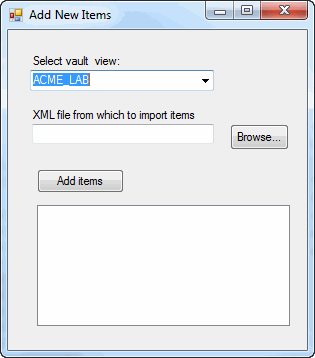
This example shows how to add items to a vault. The data for the items is imported from an XML file, which is read by the .NET XmlReader.
NOTE: If using the primary interop assembly provided with SOLIDWORKS PDM Professional, see Using .NET Framework 4.0 in Stand-alone Applications.
//----------------------------------------------------------------------------
// Preconditions:
//  1. Create an XML file for this example.
//     a. Open a text editor like Notepad and copy and paste this code
//        into the editor.
//     b. Save the file as Items.xml and remember where you save the file.
//  2. Open the SOLIDWORKS PDM Professional Administration tool.
//  3. Log into the vault where to add a new serial number.
//     a. Right-click Serial Numbers and click New Serial Number.
//        1. Type AddItems in Name.
//        2. For Format string, click the right-arrow button and select Counter value > 00001.
//        3. Click OK.
//     b. Right-click Items and select Open.
//        1. Click AddItems in Item Serial Number.
//        2. Click OK.
//  4. Start Microsoft Visual Studio.
//     a. Click File > New > Project > C# > Windows Forms Application.
//     b. Type AddItems in Name.
//     c. Click the Browse button and browse to the folder where to create the project.
//     d. Click OK.
//     e. Click Show All Files in the Solution Explorer toolbar.
//     f. Create a form similar to the form shown above and change:
//        1. Top label to VaultsLabel.
//        2. Combo box to VaultsComboBox.
//        3. Second label to XmlLabel.
//        4. Text box to XmlTextBox.
//        5. Browse button to BrowseButton.
//        6. Add items button to AddItemsButton.
//        7. List box to ItemsListBox.
//     g. Replace the code in Form1.cs with this code.
//     h. Replace the code in Form1.Designer.cs with this code.
//     i. Right-click the AddItemsCSharp project name in the Solution Explorer.
//        1. Click Add > Class > Class.
//        2. Type EdmVaultSingleton.cs in Name.
//        3. Click Add.
//        4. Replace the code in EdmVaultSingleton.cs with this code.
//     j. Right-click the AddItems project name in the Solution Explorer.
//        1. Click Add > Class > Class.
//        2. Type NewItem.cs in Name.
//        3. Click Add.
//        4. Replace the code in NewItem.cs with this code.
//  5. Add EPDM.Interop.epdm.dll as a reference (right-click the project
//     name in the Solution Explorer, click Add Reference, click
//     Assemblies > Framework in the left-side panel, browse to the top folder of your
//     SOLIDWORKS PDM Professional installation, locate and click
//     EPDM.Interop.epdm.dll, click Open, click Add, and click Close).
//  6. Right-click EPDM.Interop.epdm in References, click Properties, and set
//     Embed Interop Types to False to handle methods that pass arrays of
//     structures.
//  7. Click Debug > Start Debugging or press F5.
//
// Postconditions:
//  1. Displays a dialog.
//  2. Select a vault.
//  3. Click the Browse button, locate and select Items.xml, and click Open.
//  4. Click the Add items button.
//     The new items are printed in the dialog's list.
//  5. Close the dialog.
//  6. Open the SOLIDWORKS PDM Professional Item Explorer tool.
//     (In Windows 7, click Start > All Programs > SOLIDWORKS PDM Professional >
//     Item Explorer.)
//  7. Expand the vault where the new items were added.
//     The new items are listed below the name of the expanded vault.
//----------------------------------------------------------------------------
<?xml version="1.0" encoding="utf-8"?>
<ArrayOfAnyType xmlns:xsi="http://www.w3.org/2001/XMLSchema-instance" xmlns:xsd="http://www.w3.org/2001/XMLSchema">
  <anyType xsi:type="Item">
    <Description>First Item</Description>
    <ProjectName>Project 1</ProjectName>
    <ProjectNumber>1</ProjectNumber>
    <PartType>Purchased</PartType>
    <ItemName>Item 1</ItemName>
  </anyType>
  <anyType xsi:type="Item">
    <Description>Second Item</Description>
    <ProjectName>Project 2</ProjectName>
    <ProjectNumber>2</ProjectNumber>
    <PartType>Built</PartType>
    <ItemName>Item 2</ItemName>
  </anyType>
  <anyType xsi:type="Item">
    <Description>Third Item</Description>
    <ProjectName>Project 3</ProjectName>
    <ProjectNumber>3</ProjectNumber>
    <PartType>Purchased</PartType>
    <ItemName>Item 3</ItemName>
  </anyType>
  <anyType xsi:type="Item">
    <Description>Fourth Item</Description>
    <ProjectName>Project 4</ProjectName>
    <ProjectNumber>4</ProjectNumber>
    <PartType>Built</PartType>
    <ItemName>Item 4</ItemName>
  </anyType>
  <anyType xsi:type="Item">
    <Description>Fifth Item</Description>
    <ProjectName>Project 5</ProjectName>
    <ProjectNumber>5</ProjectNumber>
    <PartType>Purchased</PartType>
    <ItemName>Item 5</ItemName>
  </anyType>
  <anyType xsi:type="Item">
    <Description>Sixth Item</Description>
    <ProjectName>Project 6</ProjectName>
    <ProjectNumber>6</ProjectNumber>
    <PartType>Built</PartType>
    <ItemName>Item 6</ItemName>
  </anyType>
  <anyType xsi:type="Item">
    <Description>Seventh Item</Description>
    <ProjectName>Project 7</ProjectName>
    <ProjectNumber>7</ProjectNumber>
    <PartType>Purchased</PartType>
    <ItemName>Item 7</ItemName>
  </anyType>
  <anyType xsi:type="Item">
    <Description>Eighth Item</Description>
    <ProjectName>Project 8</ProjectName>
    <ProjectNumber>8</ProjectNumber>
    <PartType>Built</PartType>
    <ItemName>Item 8</ItemName>
  </anyType>
  <anyType xsi:type="Item">
    <Description>Ninth Item</Description>
    <ProjectName>Project 9</ProjectName>
    <ProjectNumber>9</ProjectNumber>
    <PartType>Purchased</PartType>
    <ItemName>Item 9</ItemName>
  </anyType>
  <anyType xsi:type="Item">
    <Description>Tenth Item</Description>
    <ProjectName>Project 10</ProjectName>
    <ProjectNumber>10</ProjectNumber>
    <PartType>Built</PartType>
    <ItemName>Item 10</ItemName>
  </anyType>
</ArrayOfAnyType>
//Form1.cs
using System;
using System.IO;
using EPDM.Interop.epdm;
using System.Collections;
using System.Diagnostics;
using System.Runtime.InteropServices;
using System.Windows.Forms;

namespace AddItemsCSharp
{
    public partial class Form1 : Form
    {
        public Form1()
        {
            InitializeComponent();
        }

        void BrowseButton_Click(System.Object sender, System.EventArgs e)
        {
            try
            {
                DialogResult dlgResult = XmlOpenFileDialog.ShowDialog();
                if (dlgResult == DialogResult.Cancel)
                {
                    return;
                }
                XmlTextBox.Text = XmlOpenFileDialog.FileName;
            }
            catch (System.Runtime.InteropServices.COMException ex)
            {
                MessageBox.Show("HRESULT = 0x" + ex.ErrorCode.ToString("X") + " " + ex.Message);
            }
            catch (Exception ex)
            {
                MessageBox.Show(ex.Message);
            }
        }

        public void AddItemsButton_Click(System.Object sender, System.EventArgs e)
        {

            try
            {
                ItemsListBox.Items.Clear();
                ArrayList NewItems = new ArrayList();

                using (System.Xml.XmlReader XmlReader = System.Xml.XmlReader.Create(XmlTextBox.Text))
                {

                    XmlReader.Read();
                    XmlReader.ReadToNextSibling("ArrayOfAnyType");
                    XmlReader.ReadToDescendant("anyType");
                    do
                    {
                        NewItem CurItem = new NewItem();
                        XmlReader.ReadToDescendant("Description");
                        CurItem.Description = XmlReader.ReadString();
                        XmlReader.ReadToNextSibling("ProjectName");
                        CurItem.ProjectName = XmlReader.ReadString();
                        XmlReader.ReadToNextSibling("ProjectNumber");
                        CurItem.ProjectNumber = XmlReader.ReadString();
                        XmlReader.ReadToNextSibling("PartType");
                        CurItem.PartType = XmlReader.ReadString();
                        XmlReader.ReadToNextSibling("ItemName");
                        CurItem.ItemName = XmlReader.ReadString();
                        NewItems.Add(CurItem);
                    } while (XmlReader.ReadToFollowing("anyType"));
                }

                //Obtain the only instance of the IEdmVault5 object
                IEdmVault5 vault = EdmVaultSingleton.Instance;

                if (!vault.IsLoggedIn)
                {
                    //Log into selected vault as the current user
                    vault.LoginAuto(VaultsComboBox.Text, this.Handle.ToInt32());
                }

                //Create the batch interface
                IEdmBatchItemGeneration2 BatchItemGen = default(IEdmBatchItemGeneration2);

                IEdmVault7 vault1 = (IEdmVault7)vault;
                BatchItemGen = (IEdmBatchItemGeneration2)vault1.CreateUtility(EdmUtility.EdmUtil_BatchItemGeneration);
                EdmVarVal[] VarVals = new EdmVarVal[4];
                VarVals[0].mlEdmVarValFlags = 0;
                VarVals[0].moVarIDorName = "Description";
                VarVals[1].mlEdmVarValFlags = 0;
                VarVals[1].moVarIDorName = "Project Name";
                VarVals[2].mlEdmVarValFlags = 0;
                VarVals[2].moVarIDorName = "Project number";
                VarVals[3].mlEdmVarValFlags = 0;
                VarVals[3].moVarIDorName = "Part Type";
                for (int i = 0; i <= NewItems.Count - 1; i++)
                {
                    VarVals[0].moValue = (NewItems[i] as NewItem).Description;
                    VarVals[1].moValue = (NewItems[i] as NewItem).ProjectName;
                    VarVals[2].moValue = (NewItems[i] as NewItem).ProjectNumber;
                    VarVals[3].moValue = (NewItems[i] as NewItem).PartType;
                    BatchItemGen.AddSelection2((EdmVault5)vault, VarVals, ((NewItems[i] as NewItem).ItemName),0, 0, 0,"", (int)EdmRefFlags.EdmRef_Dynamic);

                }

                //Build the item tree
                bool CreateSuccess = false;
                CreateSuccess = BatchItemGen.CreateTree(((int)(this.Handle.ToInt32())), (int)EdmItemGenerationFlags.Eigcf_Nothing);
                if ((CreateSuccess == false))
                    return;


                //Generate the items
                EdmGenItemInfo[] ReturnedItems = null;
                bool bOpenExplorer = false;
                BatchItemGen.GenerateItems(this.Handle.ToInt32(), out ReturnedItems, out bOpenExplorer, null);

                //Display the new item information in the list box
                string msg = "";
                if (ReturnedItems.Length == 0)
                {
                    msg = "No items were added.";
                    ItemsListBox.Items.Add("No items were added.");
                }
                else
                {
                    foreach (EdmGenItemInfo ItemInfo in ReturnedItems)
                    {

                        ItemsListBox.Items.Add("Item name: " + ItemInfo.mbsItemName);
                        ItemsListBox.Items.Add("Alternate name: " + ItemInfo.mbsItemAlternativeName);

                        IEdmVault11 vault2 = (IEdmVault11)vault;
                        ItemsListBox.Items.Add("Status: " + vault2.GetErrorMessage(ItemInfo.mhResult));
                        ItemsListBox.Items.Add("");
                    }
                }
            }
            catch (System.Runtime.InteropServices.COMException ex)
            {
                MessageBox.Show("HRESULT = 0x" + ex.ErrorCode.ToString("X") + " " + ex.Message);
            }
            catch (Exception ex)
            {
                MessageBox.Show(ex.Message);
            }
        }

        public void AddItems_Load(System.Object sender, System.EventArgs e)
        {
            try
            {
                //Obtain the only instance of the IEdmVault object
                IEdmVault8 vault = (IEdmVault8)EdmVaultSingleton.Instance;
                EdmViewInfo[] Views = null;

                vault.GetVaultViews(out Views, false);
                VaultsComboBox.Items.Clear();
                foreach (EdmViewInfo View in Views)
                {
                    VaultsComboBox.Items.Add(View.mbsVaultName);
                }
                if (VaultsComboBox.Items.Count > 0)
                {
                    VaultsComboBox.Text = (string)VaultsComboBox.Items[0];
                }
            }
            catch (System.Runtime.InteropServices.COMException ex)
            {
                MessageBox.Show("HRESULT = 0x" + ex.ErrorCode.ToString("X") + " " + ex.Message);
            }
            catch (Exception ex)
            {
                MessageBox.Show(ex.Message);
            }
        }
    }
}
//Form1.Designer.cs
namespace AddItemsCSharp
{
    partial class Form1
    {
        /// <summary>
        /// Required designer variable.
        /// </summary>
        private System.ComponentModel.IContainer components = null;

        /// <summary>
        /// Clean up any resources being used.
        /// </summary>
        /// <param name="disposing">true if managed resources should be disposed; otherwise, false.</param>
        protected override void Dispose(bool disposing)
        {
            if (disposing && (components != null))
            {
                components.Dispose();
            }
            base.Dispose(disposing);
        }

        #region Windows Form Designer generated code

        /// <summary>
        /// Required method for Designer support - do not modify
        /// the contents of this method with the code editor.
        /// </summary>
        private void InitializeComponent()
        {
            this.VaultsLabel = new System.Windows.Forms.Label();
            this.VaultsComboBox = new System.Windows.Forms.ComboBox();
            this.XmlLabel = new System.Windows.Forms.Label();
            this.XmlTextBox = new System.Windows.Forms.TextBox();
            this.BrowseButton = new System.Windows.Forms.Button();
            this.AddItemsButton = new System.Windows.Forms.Button();
            this.ItemsListBox = new System.Windows.Forms.ListBox();
            this.XmlOpenFileDialog = new System.Windows.Forms.OpenFileDialog();
            this.SuspendLayout();
            //
            //XmlOpenFileDialog
            //
            this.XmlOpenFileDialog.Filter = "XML files|*.XML";
            //

            // VaultsLabel
            //
            this.VaultsLabel.AutoSize = true;
            this.VaultsLabel.Location = new System.Drawing.Point(22, 22);
            this.VaultsLabel.Name = "VaultsLabel";
            this.VaultsLabel.Size = new System.Drawing.Size(91, 13);
            this.VaultsLabel.TabIndex = 0;
            this.VaultsLabel.Text = "Select vault view:";
            //
            // VaultsComboBox
            //
            this.VaultsComboBox.FormattingEnabled = true;
            this.VaultsComboBox.Location = new System.Drawing.Point(25, 38);
            this.VaultsComboBox.Name = "VaultsComboBox";
            this.VaultsComboBox.Size = new System.Drawing.Size(174, 21);
            this.VaultsComboBox.TabIndex = 1;
            //
            // XmlLabel
            //
            this.XmlLabel.AutoSize = true;
            this.XmlLabel.Location = new System.Drawing.Point(25, 91);
            this.XmlLabel.Name = "XmlLabel";
            this.XmlLabel.Size = new System.Drawing.Size(172, 13);
            this.XmlLabel.TabIndex = 2;
            this.XmlLabel.Text = "XML file from which to import items:";
            //
            // XmlTextBox
            //
            this.XmlTextBox.Location = new System.Drawing.Point(28, 107);
            this.XmlTextBox.Name = "XmlTextBox";
            this.XmlTextBox.Size = new System.Drawing.Size(171, 20);
            this.XmlTextBox.TabIndex = 3;
            //
            // BrowseButton
            //
            this.BrowseButton.Location = new System.Drawing.Point(216, 107);
            this.BrowseButton.Name = "BrowseButton";
            this.BrowseButton.Size = new System.Drawing.Size(75, 23);
            this.BrowseButton.TabIndex = 4;
            this.BrowseButton.Text = "Browse...";
            this.BrowseButton.UseVisualStyleBackColor = true;
            this.BrowseButton.Click += new System.EventHandler(this.BrowseButton_Click);
            //
            // AddItemsButton
            //
            this.AddItemsButton.Location = new System.Drawing.Point(28, 149);
            this.AddItemsButton.Name = "AddItemsButton";
            this.AddItemsButton.Size = new System.Drawing.Size(75, 23);
            this.AddItemsButton.TabIndex = 5;
            this.AddItemsButton.Text = "Add items";
            this.AddItemsButton.UseVisualStyleBackColor = true;
            this.AddItemsButton.Click += new System.EventHandler(this.AddItemsButton_Click);
            //
            // ItemListBox
            //
            this.ItemsListBox.FormattingEnabled = true;
            this.ItemsListBox.Location = new System.Drawing.Point(28, 196);
            this.ItemsListBox.Name = "ItemsListBox";
            this.ItemsListBox.Size = new System.Drawing.Size(263, 95);
            this.ItemsListBox.TabIndex = 6;

            //
            // Form1
            //
            this.AutoScaleDimensions = new System.Drawing.SizeF(6F, 13F);
            this.AutoScaleMode = System.Windows.Forms.AutoScaleMode.Font;
            this.ClientSize = new System.Drawing.Size(334, 311);
            this.Controls.Add(this.ItemsListBox);
            this.Controls.Add(this.AddItemsButton);
            this.Controls.Add(this.BrowseButton);
            this.Controls.Add(this.XmlTextBox);
            this.Controls.Add(this.XmlLabel);
            this.Controls.Add(this.VaultsComboBox);
            this.Controls.Add(this.VaultsLabel);
            this.Name = "Form1";
            this.Text = "Add new items";
            this.Load  += new System.EventHandler(this.AddItems_Load);
            this.ResumeLayout(false);
            this.PerformLayout();

        }

        #endregion

        private System.Windows.Forms.Label VaultsLabel;
        private System.Windows.Forms.ComboBox VaultsComboBox;
        private System.Windows.Forms.Label XmlLabel;
        private System.Windows.Forms.TextBox XmlTextBox;
        private System.Windows.Forms.Button BrowseButton;
        private System.Windows.Forms.Button AddItemsButton;
        private System.Windows.Forms.ListBox ItemsListBox;
        private System.Windows.Forms.OpenFileDialog XmlOpenFileDialog;
    }
}
//EdmVaultSingleton.cs
using System;
using System.Collections;
using System.Diagnostics;
using System.Threading;
using EPDM.Interop.epdm;

namespace AddItemsCSharp
{
    public class EdmVaultSingleton
    {
        private static EdmVault5 mInstance = null;
        private static object mLockObj = new object();

        private EdmVaultSingleton()
        {

        }

        public static EdmVault5 Instance
        {
            get
            {
                try
                {
                    if (mInstance == null)
                    {
                        Monitor.Enter(mLockObj);
                        if (mInstance == null)
                        {
                            mInstance = new EdmVault5();
                        }
                        Monitor.Exit(mLockObj);
                    }
                }
                catch (Exception ex)
                {
                    Monitor.Exit(mLockObj);
                }

                return mInstance;

            }
        }

    }
}
//NewItem.cs
using System;
using System.Collections;
using System.Diagnostics;

namespace AddItemsCSharp
{
    public class NewItem
    {
        //Value of "Description" variable
        private string mDescription;
        //Value of "Project Name" variable
        private string mProjectName;
        //Value of "Project number" variable
        private string mProjectNumber;
        //Value of "Part Type" variable
        private string mPartType;
        //Item name
        private string mItemName;

        public NewItem()
        {

        }

        public string Description
        {
            get { return mDescription; }
            set { mDescription = value; }
        }

        public string ProjectName
        {
            get { return mProjectName; }
            set { mProjectName = value; }
        }

        public string ProjectNumber
        {
            get { return mProjectNumber; }
            set { mProjectNumber = value; }
        }

        public string PartType
        {
            get { return mPartType; }
            set { mPartType = value; }
        }

        public string ItemName
        {
            get { return mItemName; }
            set { mItemName = value; }
        }

    }
}