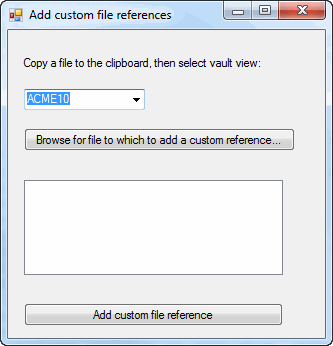
This example shows how to add a custom file reference to a file in the vault.
NOTE: If using the primary interop assembly provided with SOLIDWORKS PDM Professional, see Using .NET Framework 4.0 in Stand-alone Applications.
//----------------------------------------------------------------------------
// Preconditions:
// 1. Start Microsoft Visual Studio.
// a. Click File > New > Project > Visual
C# > Windows Forms Application.
// b. Type CustRefCSharp in Name.
// c. Click Browse and navigate to the folder where to create
// the project.
// d. Click OK.
// e. Click Show All Files in the Solution Explorer toolbar and expand
// Form1.cs in the Solution Explorer.
// f. Create a form similar to the form shown above and change:
// 1. Top label to VaultsLabel.
// 2. Combo box to VaultsComboBox.
// 3. Browse button to BrowseButton.
// 4. List box to CustRefListBox.
// 5. Add custom file reference button to AddCustomFileReference.
// g. Replace the code in Form1.cs with this code.
// h. Replace the code in Form1.Designer.cs with this code.
// 2. Add EPDM.Interop.epdm.dll as a reference (right-click the project
// name in the Solution Explorer, click Add Reference, click
// Assemblies > Framework in the left-side panel, browse to the top folder of
// your SOLIDWORKS PDM Professional installation, locate and click
// EPDM.Interop.epdm.dll, click Open, click Add, and click Close).
// 3. Right-click EPDM.Interop.epdm in References, click Properties, and set
// Embed Interop Types to False to handle methods that pass arrays of
// structures.
// 4. Click Debug > Start Debugging or press F5.
//
// Postconditions:
// 1. The Add custom references dialog displays.
// 2. Select a vault.
// 3. Click Browse for file to which to add custom reference,
// locate and click a file in the vault, and click Open.
// The file is checked out.
// 4. In a view of the selected vault, right-click a file and click Copy.
// 5. In the
Add custom references dialog, click Add custom file reference.
// The file that was copied to the clipboard is added as a custom
// reference to the checked-out file.
// 6. In the Create File References dialog, click OK.
// The file is checked in.
// 7. In the Edit User-Defined File References dialog, click OK.
// 8. Close the Add custom references dialog.
//----------------------------------------------------------------------------
//Form1.cs
using System.IO;
using System.Xml.Serialization;
using System;
using System.Collections;
using System.Collections.Generic;
using System.Data;
using System.Diagnostics;
using System.Windows.Forms;
using System.ComponentModel;
using EPDM.Interop.epdm;
namespace CustRefCSharp
{
public partial class Form1 : Form
{
public Form1()
{
InitializeComponent();
}
IEdmVault5 vault1 = null;
public void FileReferencesCSharp_Load(System.Object sender, System.EventArgs e)
{
try
{
IEdmVault5 vault1 = new EdmVault5();
IEdmVault8 vault = (IEdmVault8)vault1;
EdmViewInfo[] Views = null;
vault.GetVaultViews(out Views, false);
VaultsComboBox.Items.Clear();
foreach (EdmViewInfo View in Views)
{
VaultsComboBox.Items.Add(View.mbsVaultName);
}
if (VaultsComboBox.Items.Count > 0)
{
VaultsComboBox.Text = (string)VaultsComboBox.Items[0];
}
}
catch (System.Runtime.InteropServices.COMException ex)
{
MessageBox.Show("HRESULT = 0x" + ex.ErrorCode.ToString("X") + "\n" + ex.Message);
}
catch (Exception ex)
{
MessageBox.Show(ex.Message);
}
}
public void BrowseButton_Click(System.Object sender, System.EventArgs e)
{
try
{
CustRefListBox.Items.Clear();
//Only create a new vault object
//if one hasn't been created yet
if (vault1 == null)
vault1 = new EdmVault5();
if (!vault1.IsLoggedIn)
{
//Log into selected vault as the current user
vault1.LoginAuto(VaultsComboBox.Text, this.Handle.ToInt32());
}
//Set the initial directory in the File Open dialog
CustRefOpenFileDialog.InitialDirectory = vault1.RootFolderPath;
//Show the File Open dialog
System.Windows.Forms.DialogResult DialogResult = default(System.Windows.Forms.DialogResult);
DialogResult = CustRefOpenFileDialog.ShowDialog();
//If the user didn't click Open, exit the sub
if (!(DialogResult == System.Windows.Forms.DialogResult.OK))
return;
foreach (string FileName in CustRefOpenFileDialog.FileNames)
{
CustRefListBox.Items.Add(FileName);
}
}
catch (System.Runtime.InteropServices.COMException ex)
{
MessageBox.Show("HRESULT = 0x" + ex.ErrorCode.ToString("X") + "\n" + ex.Message);
}
catch (Exception ex)
{
MessageBox.Show(ex.Message);
}
}
public void AddCustomFileReference_Click(System.Object sender, System.EventArgs e)
{
try
{
//Only create a new vault object
//if one hasn't been created yet
IEdmVault7 vault2 = null;
if (vault1 == null)
vault1 = new EdmVault5();
vault2 = (IEdmVault7)vault1;
if (!vault1.IsLoggedIn)
{
//Log into selected vault as the current user
vault1.LoginAuto(VaultsComboBox.Text, this.Handle.ToInt32());
}
IEdmAddCustomRefs addCustRefs = (IEdmAddCustomRefs)vault2.CreateUtility(EdmUtility.EdmUtil_AddCustomRefs);
Int32[] ppoFileIdArray = new Int32[CustRefListBox.Items.Count];
IEdmFile5 file = null;
IEdmFolder5 parentFolder = null;
int i = 0;
foreach (string FileName in CustRefListBox.Items)
{
file = vault2.GetFileFromPath(FileName, out parentFolder);
if (!file.IsLocked) {
file.LockFile(parentFolder.ID, this.Handle.ToInt32(), (int)EdmLockFlag.EdmLock_Simple);
}
ppoFileIdArray[i] = file.ID;
i++;
}
Boolean retCode = false;
//Add the file that is copied to the clipboard as a custom reference to the selected file
foreach (int ID in ppoFileIdArray)
{
addCustRefs.AddReferencesClipboard(ID);
addCustRefs.CreateTree((int)EdmCreateReferenceFlags.Ecrf_Nothing);
addCustRefs.ShowDlg(this.Handle.ToInt32());
retCode = addCustRefs.CreateReferences();
}
// Check in the file
file.UnlockFile(this.Handle.ToInt32(), "Custom reference added");
//Display current custom file references
retCode = addCustRefs.ShowEditReferencesDlg(ref ppoFileIdArray, this.Handle.ToInt32());
}
catch (System.Runtime.InteropServices.COMException ex)
{
MessageBox.Show("HRESULT = 0x" + ex.ErrorCode.ToString("X") + "\n" + ex.Message);
}
catch (Exception ex)
{
MessageBox.Show(ex.Message);
}
}
}
}
namespace CustRefCSharp
{
partial class Form1
{
/// <summary>
/// Required designer variable.
/// </summary>
private System.ComponentModel.IContainer components = null;
/// <summary>
/// Clean up any resources being used.
/// </summary>
/// <param name="disposing">true if managed resources should be disposed; otherwise, false.</param>
protected override void Dispose(bool disposing)
{
if (disposing && (components != null))
{
components.Dispose();
}
base.Dispose(disposing);
}
#region Windows Form Designer generated code
/// <summary>
/// Required method for Designer support - do not modify
/// the contents of this method with the code editor.
/// </summary>
private void InitializeComponent()
{
this.VaultsLabel = new System.Windows.Forms.Label();
this.VaultsComboBox = new System.Windows.Forms.ComboBox();
this.BrowseButton = new System.Windows.Forms.Button();
this.CustRefListBox = new System.Windows.Forms.ListBox();
this.AddCustomFileReference = new System.Windows.Forms.Button();
this.CustRefOpenFileDialog = new System.Windows.Forms.OpenFileDialog();
this.SuspendLayout();
//
// VaultsLabel
//
this.VaultsLabel.AutoSize = true;
this.VaultsLabel.Location = new System.Drawing.Point(13, 26);
this.VaultsLabel.Name = "VaultsLabel";
this.VaultsLabel.Size = new System.Drawing.Size(244, 13);
this.VaultsLabel.TabIndex = 0;
this.VaultsLabel.Text = "Copy a file to the clipboard, then select vault view:";
//
// VaultsComboBox
//
this.VaultsComboBox.FormattingEnabled = true;
this.VaultsComboBox.Location = new System.Drawing.Point(16, 59);
this.VaultsComboBox.Name = "VaultsComboBox";
this.VaultsComboBox.Size = new System.Drawing.Size(121, 21);
this.VaultsComboBox.TabIndex = 1;
//
// BrowseButton
//
this.BrowseButton.Location = new System.Drawing.Point(16, 98);
this.BrowseButton.Name = "BrowseButton";
this.BrowseButton.Size = new System.Drawing.Size(271, 23);
this.BrowseButton.TabIndex = 3;
this.BrowseButton.Text = "Browse for file to which to add a custom reference...";
this.BrowseButton.UseVisualStyleBackColor = true;
this.BrowseButton.Click += new System.EventHandler(this.BrowseButton_Click);
//
// CustRefListBox
//
this.CustRefListBox.FormattingEnabled = true;
this.CustRefListBox.Location = new System.Drawing.Point(16, 150);
this.CustRefListBox.Name = "CustRefListBox";
this.CustRefListBox.Size = new System.Drawing.Size(259, 95);
this.CustRefListBox.TabIndex = 4;
//
// AddCustomFileReference
//
this.AddCustomFileReference.Location = new System.Drawing.Point(16, 273);
this.AddCustomFileReference.Name = "AddCustomFileReference";
this.AddCustomFileReference.Size = new System.Drawing.Size(259, 23);
this.AddCustomFileReference.TabIndex = 5;
this.AddCustomFileReference.Text = "Add custom file reference";
this.AddCustomFileReference.UseVisualStyleBackColor = true;
this.AddCustomFileReference.Click += new System.EventHandler(this.AddCustomFileReference_Click);
//
// Form1
//
this.AutoScaleDimensions = new System.Drawing.SizeF(6F, 13F);
this.AutoScaleMode = System.Windows.Forms.AutoScaleMode.Font;
this.ClientSize = new System.Drawing.Size(317, 308);
this.Controls.Add(this.AddCustomFileReference);
this.Controls.Add(this.CustRefListBox);
this.Controls.Add(this.BrowseButton);
this.Controls.Add(this.VaultsComboBox);
this.Controls.Add(this.VaultsLabel);
this.Name = "Form1";
this.Text = "Add custom file references";
this.Load += new System.EventHandler(this.FileReferencesCSharp_Load);
this.ResumeLayout(false);
this.PerformLayout();
}
#endregion
private System.Windows.Forms.Label VaultsLabel;
private System.Windows.Forms.ComboBox VaultsComboBox;
private System.Windows.Forms.Button BrowseButton;
private System.Windows.Forms.ListBox CustRefListBox;
private System.Windows.Forms.Button AddCustomFileReference;
private System.Windows.Forms.OpenFileDialog CustRefOpenFileDialog;
}
}